
Assign
An admin assigns a file to the reviewer who should see it. Reviewers see the work assigned to them and nothing else.
Platform
Upload, translate, enforce your terminology, route to reviewers, approve, and ship, all without exporting a file or opening a second tool. Built for teams whose documents can't leave their control.
How the work moves
Most teams run translation across a machine translation tool, a shared drive, an email thread, and a spreadsheet tracking who has approved what. SpectrHQ runs the whole loop in a single workspace, so nothing is exported, re-uploaded, or slips between steps.
Projects, terminology, and translation memory live together, scoped to your organisation.
Documents come back with structure and formatting intact, glossary rules already applied.
Required terms are enforced and protected terms are left untouched.
Admins assign, reviewers approve, and the workspace tracks state throughout.
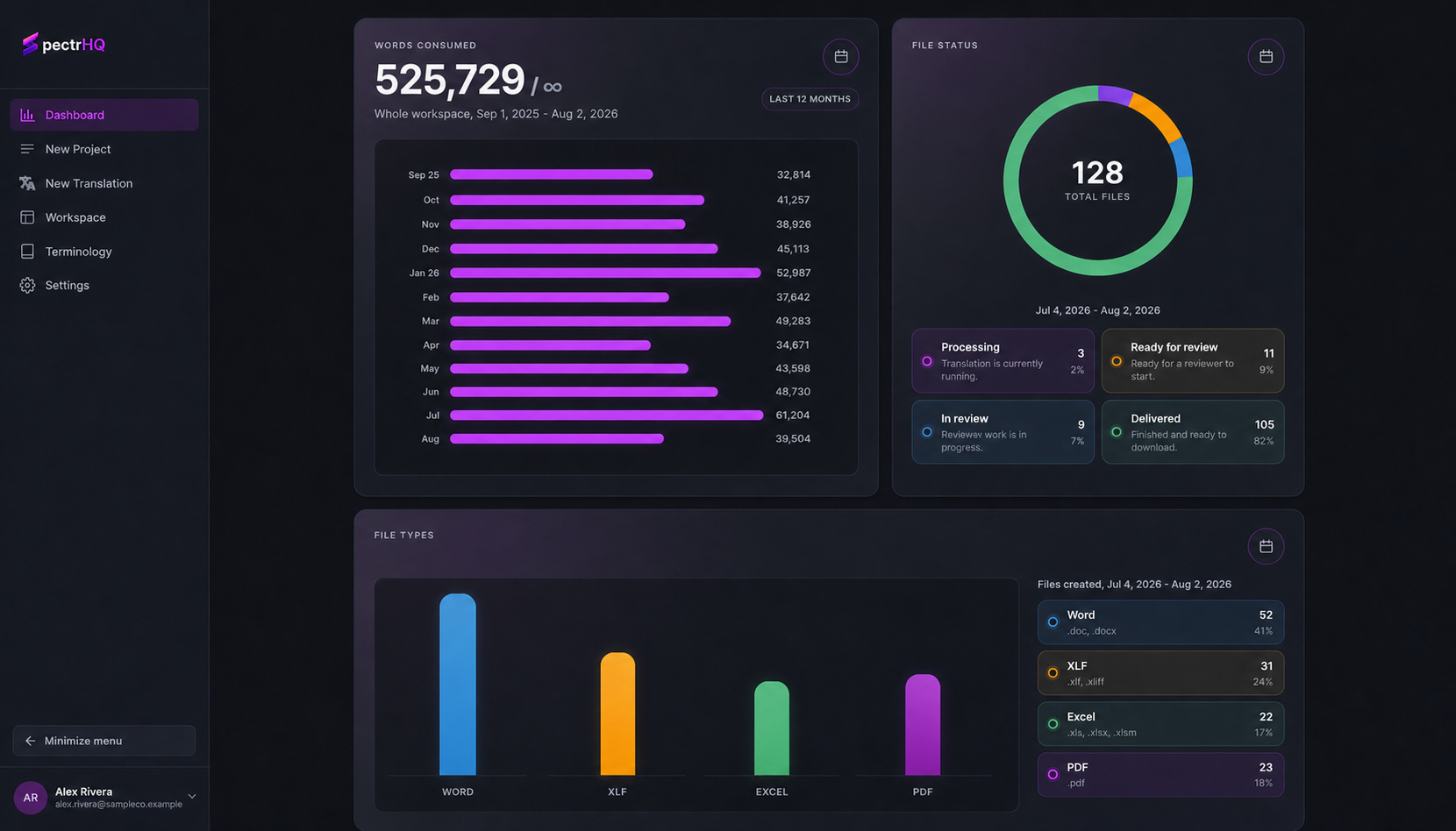
Volume, status, and readiness across every file, over any period you choose.
Translation
Upload the file you actually work in. SpectrHQ returns the same document, translated, with its structure preserved, no rebuilding layout by hand before anyone can read it.
Terminology and translation memory
Terminology is where most translation workflows quietly fail. A term approved in March comes back wrong in June, and someone catches it in review, or doesn't. SpectrHQ holds your terminology and your approved translations in the workspace and applies them to every job automatically.
Your corrections improve your workspace. They are never used to train shared models. See how
Review and approval
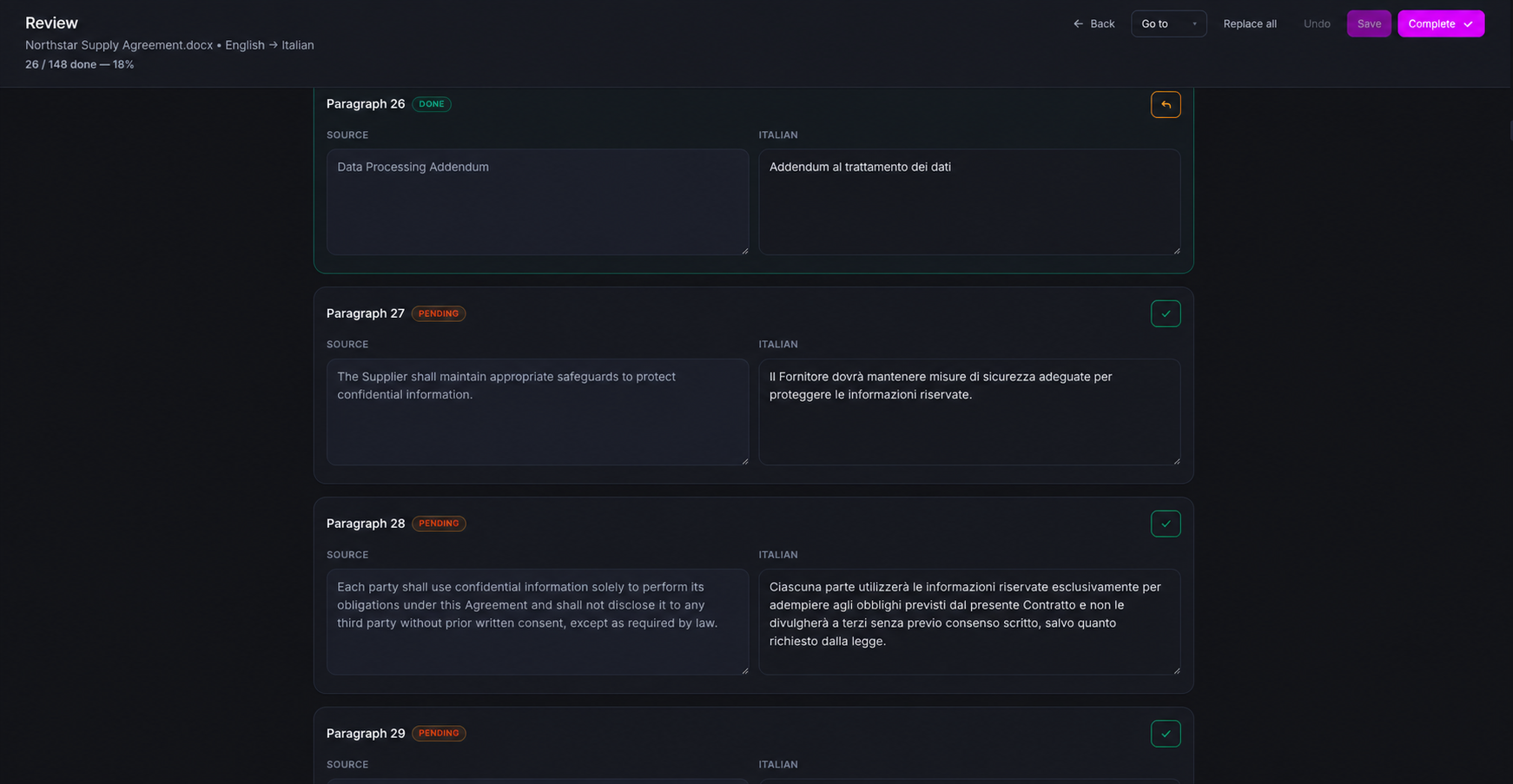
A translated file is not a finished file. Someone has to read it, correct it, and sign off on it before it goes anywhere, and that handoff is where most of the delay lives. SpectrHQ runs assignment, review, and approval as part of the workflow rather than around it.
An admin assigns a file to the reviewer who should see it. Reviewers see the work assigned to them and nothing else.
Reviewers work segment by segment against the source, editing and approving in place.
Admins are notified as work progresses, and reviewers are reminded when files are waiting on them.
The admin confirms the approved file and downloads it, ready to deploy.
Roles and access
Translation slows down when access is rationed. Editor and reviewer seats are unlimited on every plan, so you can bring in every subject-matter expert, market owner, and approver the work actually needs.
We meter translated words, not headcount. See pricing
Projects and reporting
Organise work into unlimited projects by client, product, region, business unit, or content stream, and see the state of all of it in one view.
Getting started
Put a real document through with your own terminology and your own reviewers. The workflow is the same whether you are a team of three or a global organisation running several business units. The difference is capacity, retention, and how the agreement is written.
Unlimited seats, reviewers, projects, and glossary terms. Fourteen days free, 5,000 words, no card required.
Start free trialContract-defined capacity, unlimited file retention, activity records, and procurement support. Bring your workflow and we will map it.
Book a demo